Specify TEM3P - Thermal
At this point, all of the elastic specifications are complete. So next we complete the thermal specifications.
1. TEM3P Thermal - Boundary Conditions Tab
Select the TEM3P Thermal tab and underneath that select the Boundary Conditions tab. Set the boundary condition types and data items per this table and screenshot:
Side Set    Type        Item Name             Item Value
----------------------------------------------------------------------
    1      Neumann      Heat Flux                   0
----------------------------------------------------------------------
    2      Neumann      Heat Flux                   0
----------------------------------------------------------------------
    3      Neumann      Heat Flux                   0
----------------------------------------------------------------------
    4      Neumann      Heat Flux                   0
----------------------------------------------------------------------
    5       Robin       Robin Constant Factor   20000
                        Robin Constant Value   440000
----------------------------------------------------------------------
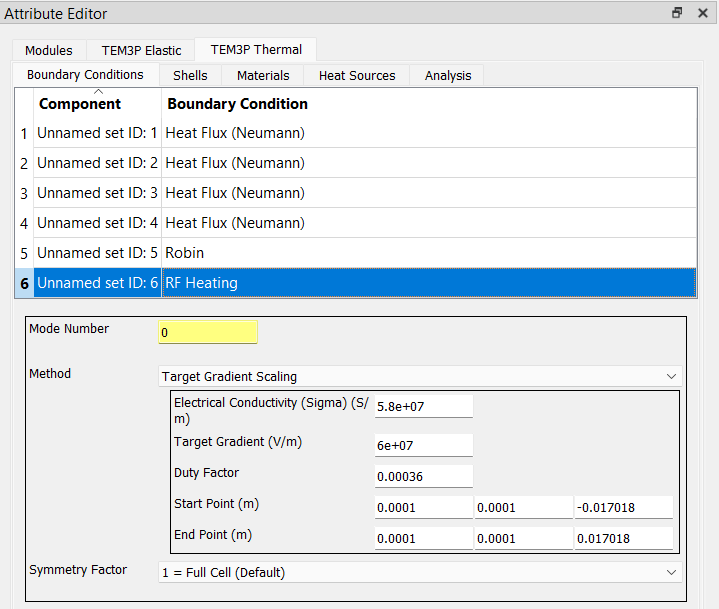
    6     RF Heating    use the values shown in the screenshot below
----------------------------------------------------------------------
2. TEM3P Thermal - Materials Tab
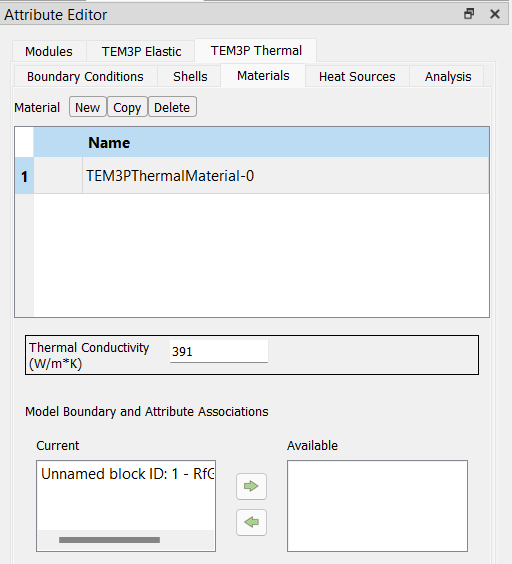
Under the TEM3P Thermal tab select the Materials tab. Add a material attribute by clicking the New button, set the Thermal Conductivity to 391, and assign Unnamed Block ID: 1 to the Current list.
3. TEM3P Thermal - Analysis Tab
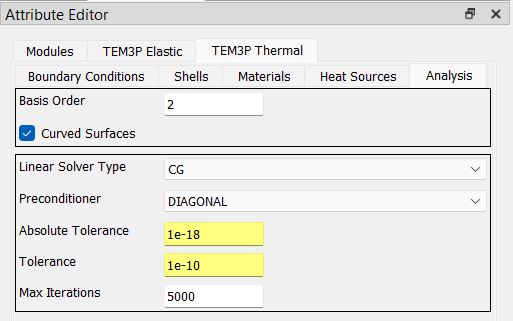
In the Analysis tab, set the parameters as shown in this screenshot: