Specify TEM3P - Elastic
Next, we will specify the elastic analysis parameters in the Attribute Editor.
1. TEM3P Elastic - Boundary Conditions Tab
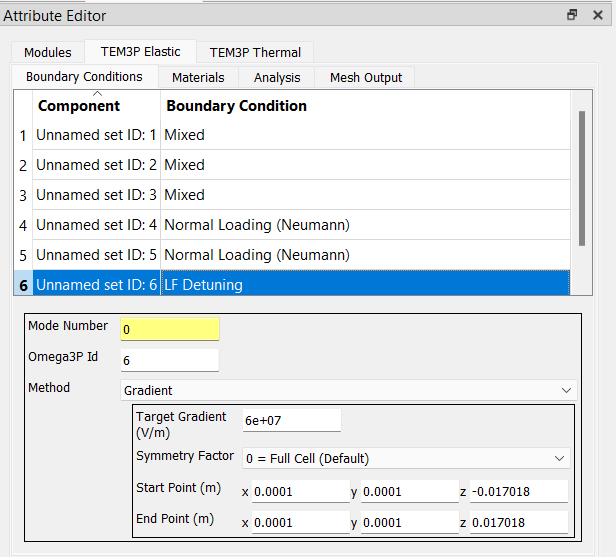
Select the TEM3P Elastic tab next and then select its Boundary Conditions tab. Set the elastic boundary condition types and data items per this table and screenshot:
Side Set   Type          Item Name             Item Value
------------------------------------------------------------------------
    1      Mixed         Mixed Type (xyz)    Neumann, Nuemann, Dirichlet
                         Mixed Value (xyz)   0, 0, 0
------------------------------------------------------------------------
    2      Mixed         Mixed Type (xyz)    Dirichlet, Neumann, Nuemann
                         Mixed Value (xyz)   0, 0, 0
------------------------------------------------------------------------
    3      Mixed         Mixed Type (xyz)    Neumann, Dirichlet, Nuemann
                         Mixed Value (xyz)   0, 0, 0
------------------------------------------------------------------------
    4     Neumann        Normal Loading      0
------------------------------------------------------------------------
    5     Neumann        Normal Loading      0
------------------------------------------------------------------------
    6     LF Detuning    use the values shown in the screenshot below
------------------------------------------------------------------------
2. TEM3P Elastic - Materials Tab
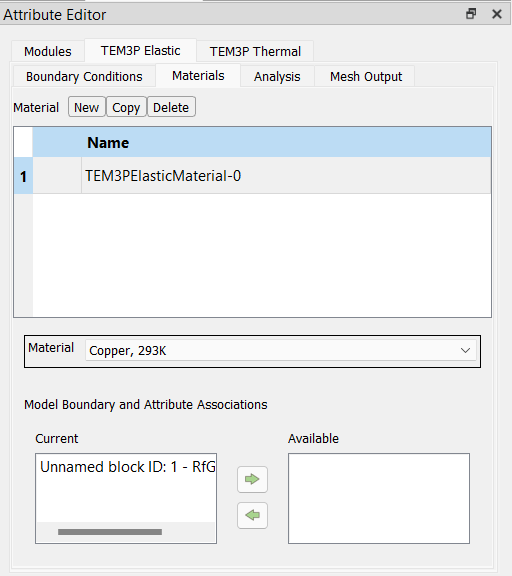
In the TEM3P Elastic tab select its Materials tab. Add a material attribute by clicking the New button, set the Material to Copper in the drop-down list, and assign Unnamed Block ID: 1 to the Current list.
3. TEM3P Elastic - Analysis Tab
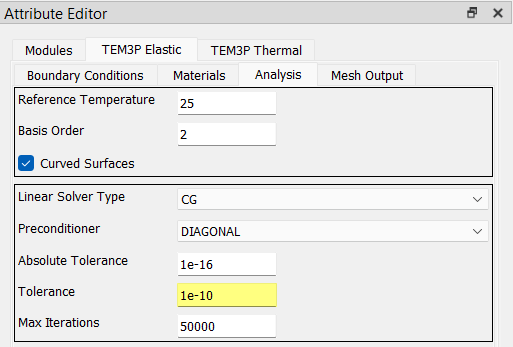
In the Analysis tab, set the elastic solver parameters as shown in this screenshot:
4. TEM3P Elastic - Mesh Output Tab
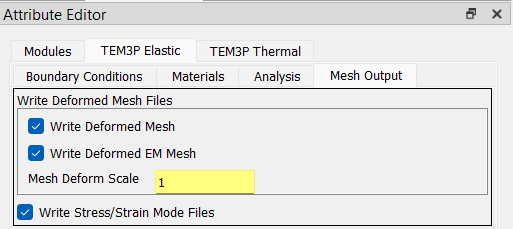
In the Mesh Output tab, set the parameters as shown in this screenshot: